


LifePoints: Rewards App
4.48.34K Reviews
App Specs
- Version
- 3.1.31
- Updated On
- License
- Free
- Downloads
- 5,000,000+
- Developer
- Kantar Profiles
- Categories
- Lifestyle
- Platform
- Android
Screenshots
 Analysis by AppCompare
Sharing a phone at home can make survey apps feel like a group activity, but the rewards are tied to individual participation. I think LifePoints: Rewards App makes the most sense when each adult uses their own account and answers from their own perspective, rather than treating one profile as a household account. That distinction matters: a survey may ask about a person’s habits, purchases, or opinions, and another family member’s answers would not necessarily describe the account holder.
A realistic way to fit surveys into a household day
Picture a quiet pause while dinner is in the oven: one person checks the app, sees whether a survey suits them, and decides whether the time looks worthwhile. Later, another adult can use their own phone and account if they want to participate too. That’s a more sensible routine than passing one device around and trying to remember who started which questionnaire.
I’d treat survey invitations as optional pockets of activity, not as a task the household needs to complete. A short survey might fit a wait at an appointment; a longer one is better saved for a moment when you can concentrate. If a survey is interrupted by errands or family needs, I wouldn’t assume it will remain available when you return. Checking the time estimate before beginning helps avoid that awkward mid-task scramble.
Keep accounts and answers personal
For shared-device use, the practical boundary is simple: don’t let several people answer through one person’s profile. Survey responses are meant to reflect the participant, and mixing viewpoints could make answers inconsistent. I’d also avoid leaving an account open where another household member might accidentally continue a survey or change its details.
That doesn’t mean the app needs to become a household project. You can decide separately whether to take part, and there’s no reason to coordinate every response. If someone else asks how it works, explain that the app offers surveys and rewards, but let them make their own account choices rather than supplying answers on their behalf.
Coordinate without turning it into a chore
A little coordination can prevent annoyance when more than one person is interested. For example, agree not to claim that a shared phone is available when someone is midway through a questionnaire, and keep track of whose account is signed in before opening the app. These are ordinary device-sharing habits, not special family tools.
Notifications can be useful when you want to know about opportunities, but they can also compete with the rest of a busy day. I’d enable them only if timely reminders suit your routine, then check the app when you have a genuine chance to respond. There’s little value in letting a reward prompt interrupt family time if you are not free to complete the survey thoughtfully.
Worth Reading Before You Choose

EA SPORTS FC Mobile 26 Is a Bigger Football Game, but It Takes Time

Flipboard Shows What News Apps Must Do Beyond the Feed

Switching to Android Auto Means Rethinking Your Driving Routine

Google Calendar Makes a Crowded Week Easier to Manage

Ludo King Makes the Most of the Minutes Between Plans

Baby Panda World Brings Quick Play to Modern Phones, but Its Game Library Feels Busy
Who will feel comfortable using it?
LifePoints is a lifestyle app from Kantar Profiles. It is free, has an Everyone content rating, and its minimum operating-system requirement is version 8.0. The app has a 4.4 average from around 187,000 ratings, with more than 5 million installs. Those figures suggest that it has reached a broad audience, but they don’t tell you whether a particular survey will suit your household or whether the rewards will feel worthwhile to you.
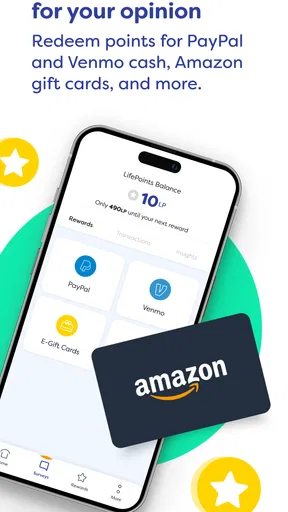
I’d recommend it to adults who don’t mind answering questions and are happy to exchange spare minutes for the possibility of points and redemption options. The app supports payouts through PayPal or Venmo as well as gift cards, which gives users some choice in how they use rewards. It is a less natural fit for anyone expecting dependable income, immediate cash, or a steady supply of surveys whenever they open the app.
For a young person in the home, the Everyone label is useful context, but I wouldn’t treat it as a reason to assume that every survey is designed for them. The app is about sharing personal opinions, so a parent or guardian should help decide whether participation is appropriate and make sure answers come from the person taking part. Household members should also keep expectations clear: one person’s account and rewards are not a shared family balance.
When another kind of app is a better match
Compared with casual games that reward repeated play, survey apps ask for considered answers rather than time spent tapping through levels. Compared with cashback tools, which are generally most relevant when you are already shopping, LifePoints is built around responding to questionnaires. I find that difference useful: it can suit someone who prefers giving feedback, but it won’t replace a savings app or a shopping reward program for a person who wants benefits tied to purchases.
The trade-off is that survey availability and eligibility can vary. A profile may match some questionnaires and not others, and a survey that looks promising can fill up. I wouldn’t plan a budget around the points or open the app expecting every visit to produce a reward. It works better as an occasional extra than as a financial strategy.
Small habits that make participation smoother
Before starting, I’d check the estimated duration and reward together, then choose only surveys that fit the time I actually have. That simple comparison is more useful than accepting every invitation automatically. If the time commitment feels out of proportion to the reward, skipping it is a reasonable choice; spare time still has value even when an app offers points.
I’d also answer carefully and consistently instead of rushing just to finish. Besides making the experience more useful, thoughtful answers avoid the frustration of trying to recall what you meant after moving quickly through a questionnaire. If a question is unclear, I’d pause rather than guess. The point is to share your own view, not to produce what you think a company wants to hear.
When you’re close to redeeming, it’s sensible to check the options shown in the app and choose one that you would genuinely use. A gift card is only useful if the retailer suits you; a digital payout is only convenient if that service works for your situation. Thinking about redemption before spending lots of small pockets of time keeps the reward goal realistic.
The app is currently at version 3.1.14, and it was released on September 20, 2021. Kantar Profiles develops it, and the experience is centered on surveys rather than entertainment or shopping. I’d look at those details as context for deciding whether the format suits me, not as a promise that every survey or reward will be available on demand.
One question people often have is whether they need to complete every survey they see. I wouldn’t treat an invitation as an obligation. Pick the ones that match your interests and available time; declining or skipping an unsuitable questionnaire is more sensible than forcing participation. Another practical question is whether it can provide reliable side income. I would not count on that: survey availability depends on fit and timing, so it is better to see any reward as incidental.
Someone considering it may also wonder whether the household can combine accounts or pool points. I’d keep participation and reward decisions individual, because the surveys ask for personal responses and the app’s options are meant to be used by the participant. If your main goal is a shared family savings pot, a household budgeting tool is a clearer fit than a survey app.
If you’re choosing between this and a different rewards app, first ask what kind of activity you’ll actually do. If you enjoy answering questions, LifePoints is more relevant than a service focused on shopping offers. If you dislike questionnaires or want guaranteed rewards for a fixed amount of time, neither the survey format nor its variable invitations are likely to satisfy you. That is the main reason I’d suggest trying it with modest expectations rather than making it part of a routine you feel obliged to maintain.
Getting Started with LifePoints
Diving into the LifePoints: Rewards App is like opening a door to a world where your opinions matter, and you get rewarded for sharing them. Setting up the app is a breeze. After downloading it from your favorite app store, you sign up with some basic details. The interface is clean and user-friendly, which is always a plus in my book.
How It Works
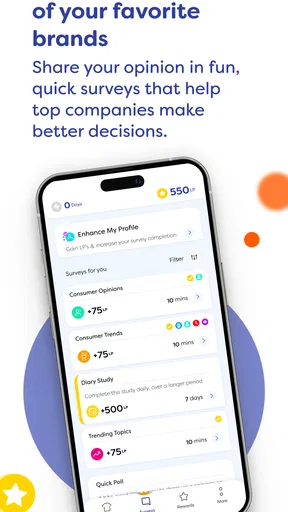
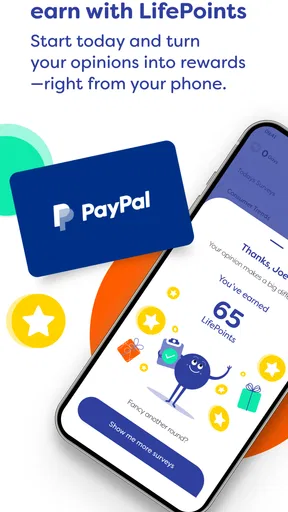
Once you're in, the app offers a variety of surveys you can participate in. These surveys cover everything from consumer products to social issues. Each survey you complete earns you LifePoints, which can be redeemed for gift cards or even cash through PayPal. I mean, who wouldn't want to get paid for their two cents?
The surveys vary in length and complexity. Some are quick, five-minute affairs, while others might take a bit longer. But the app does a good job of matching you with surveys that fit your profile, so it doesn't feel like you're wading through irrelevant content.
Features That Stand Out
One feature that caught my eye is the daily challenges. They offer a fun way to earn extra points. Completing these challenges not only boosts your point tally but also keeps things interesting and engaging. Plus, the app's notifications ensure you never miss a chance to earn more.
Another thing I appreciated is the transparency. The app clearly shows how many points you’ll earn for each survey and how long it will take. No surprises, just straightforward exchanges of time for rewards.
Rewards and Redemption
Let’s talk about the real reason you’re interested—the rewards. LifePoints offers a decent selection of gift cards from popular retailers as well as PayPal cash options. The redemption process is pretty straightforward, and the points-to-cash conversion rate is fair, making it a solid choice for anyone looking to snag some freebies or extra cash.
One tip: Always keep an eye on the special offers section. Occasionally, LifePoints will team up with brands to offer bonus points for completing specific surveys. It’s a great way to maximize your earnings.
Things to Keep in Mind
While everything sounds rosy, it's worth noting that the surveys can fill up quickly. If you don't respond to a notification promptly, you might miss out. Also, not every survey will be available to everyone, as they often target specific demographics.
Another point to remember is to be honest in your responses. The app values genuine feedback, and providing consistent, honest answers ensures you continue to receive survey opportunities.
Final Thoughts
Overall, the LifePoints: Rewards App delivers on its promise of turning your spare moments into rewarding experiences. It's not going to replace your day job, but as a fun and easy way to earn some extra pocket money or gift cards, it's definitely worth a download.
If you're someone who enjoys sharing your opinion and is looking for a straightforward way to earn rewards without any gimmicks, give LifePoints a whirl. Who knew that voicing your thoughts could be this profitable?
Pros
- Easy to navigate interface
- Variety of surveys available
- Regular updates enhance features
- Responsive customer support
- Supports multiple languages
Cons
- Limited payout options
- Surveys can be time-consuming
- Occasional app crashes
- Minimum payout threshold
- Not all users qualify for surveys
FAQs for LifePoints: Rewards App
What is LifePoints: Rewards App and how does it work?
LifePoints: Rewards App is a survey-based platform that allows users to earn points by participating in surveys and contributing their opinions. These points can be redeemed for gift cards or cash via PayPal. The app connects users with various brands seeking consumer insights, making it a rewarding way to influence product development and marketing strategies.
Is LifePoints: Rewards App free to use?
Yes, LifePoints: Rewards App is completely free to download and use. Users are not required to pay any fees to participate in surveys or redeem rewards. However, users must have an active internet connection to access surveys and check their points balance. The app is available on both Android and iOS platforms.
How do I redeem my points on LifePoints: Rewards App?
Redeeming points on LifePoints is straightforward. Once you've accumulated enough points, you can choose from a variety of redemption options including PayPal cash or gift cards for popular retailers. Simply navigate to the 'Rewards' section within the app, select your desired reward, and follow the prompts to complete the redemption process.
How much can I earn with LifePoints: Rewards App?
Earnings on LifePoints vary based on the number and type of surveys available to you. While some surveys offer more points due to their length or complexity, others may offer fewer. On average, users can expect to earn a few dollars worth of rewards each month, depending on their level of participation and the availability of surveys.
Is my personal information safe with LifePoints: Rewards App?
LifePoints takes user privacy seriously and employs robust security measures to protect personal information. The app complies with relevant data protection regulations and does not share personal data with third parties without consent. Users' responses are anonymized before being shared with brands, ensuring that personal details remain confidential.


